
capella-scan
Noten mit Texten scannen oder PDF einlesen, erkennen und in capella weiter bearbeiten
Nie mehr Noten abtippen!
Sie kennen das: Noten, die Sie nicht unverändert üben oder spielen können. Da muss etwas transponiert, neu arrangiert, vereinfacht, geändert, gekürzt, ergänzt oder sonstwie bearbeitet werden. Vielleicht brauchen Sie nur eine Stimme aus einer Partitur. Vielleicht möchten Sie die Noten nur hören. Oder Sie müssen mehrere Einzelstimmen zu einer Partitur zusammenfügen. In all diesen Fällen hilft capella-scan.
Drei Anforderungen haben Sie an Ihr Noten-Scan-Programm:
1. Zuverlässige Erkennung
Möglichst viele Objekte sollen beim ersten Versuch richtig erkannt werden. capella-scan erreicht beste Erkennungsraten bei gedruckten Noten. Noten und andere Musiksymbole sowie Texte werden erkannt.
2. Einfache Nachbearbeitung
Ohne Korrektur geht es nicht. Wenn mal etwas nicht erkannt wurde, muss die Nachbearbeitung schnell und effizient gehen. capella-scan stellt die perfekten Werkzeuge zur Verfügung, jahrzehntelang erprobt und optimiert, mit denen Erkennungsfehler ruck-zuck gefunden und korrigiert sind.
3. Sinnvolle Schnittstellen zum Zielprogramm
capella-scan ist für die direkte Zusammenarbeit mit capella optimiert. Dennoch können Sie die erkannten Noten zur weiteren Bearbeitung auch in andere Noten- oder MIDI-Programme exportieren als MusicXML- oder MIDI-Datei. Hinzu kommt der Export als Klangdatei, also Wave oder MP3. Damit hören Sie die Noten praktisch überall, z.B. auf dem Smartphone.
Zur kostenlosen 15-Tage-Version
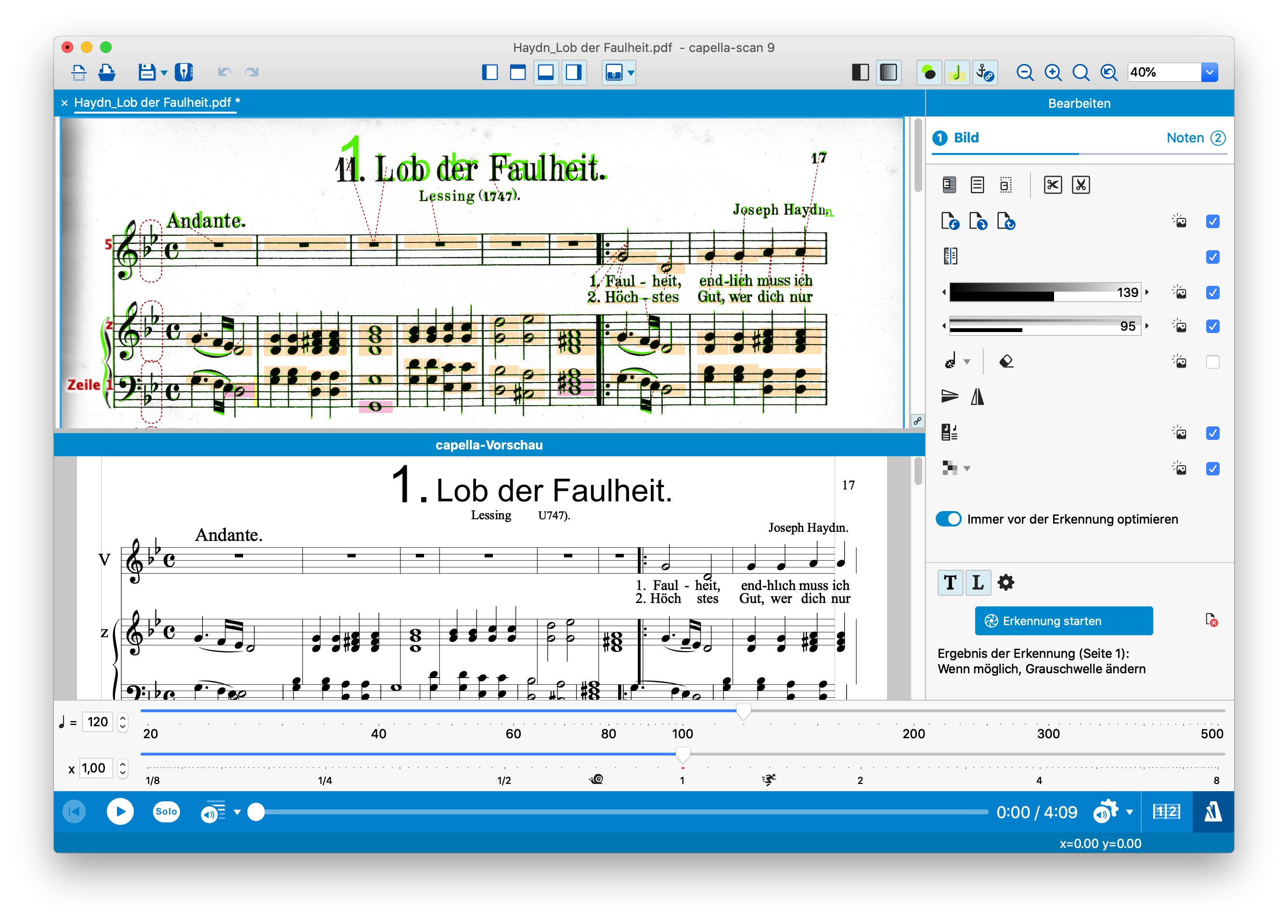
Mit capella-scan erfassen und erkennen Sie gedruckte Noten. Das spart viel Arbeit, indem Sie die erkannten Noten einfach an capella weitergeben, statt Note für Note zu tippen.
capella-scan ist die perfekte Ergänzung zu capella oder Ihrem Notensatzprogramm. capella-scan verwandelt Ihre gedruckte Vorlage z.B. in eine capella-Datei. Diese Datei bearbeiten Sie in capella nach Ihren Vorstellungen weiter (Sie brauchen beide Programme).
So geht's:
- Scannen Sie Noten oder lesen Sie ein PDF ein. Die Vorlage kann auch ein Foto (digital) sein.
- Starten Sie per Mausklick die Erkennung. capella-scan erfasst die Partitur samt Noten, Taktstrichen, Vorzeichen, Schlüsseln usw. und macht aus der Vorlage eine capella-Datei.
- Auch Texte werden erkannt und korrekt an capella weitergegeben.
- Nötige Korrekturen nehmen Sie direkt in capella-scan vor.
- Noten hören: Hören Sie an, was erkannt wurde, die ganze Partitur oder einzelne Strimmen.
Sie öffnen die Datei im Notensatzprogramm capella (capella erwerben Sie separat) und können sie nun ausdrucken. Dabei stehen Ihnen alle Bearbeitungsmöglichkeiten für die Partitur zur Verfügung: Transponieren, ändern, ergänzen, neu texten u.v.m. Natürlich können Sie auch Stimmenauszüge anfertigen oder die Besetzung ändern - Ihre Vorstellungen entscheiden...
Das kann capella-scan:
- Text: capella-scan unterscheidet zwischen Textobjekten wie Überschriften, Spielanweisungen und Liedtexten bzw. Akkordbezeichnungen oder Stimmenbezeichnungen. Alles wird korrekt in capella einsortiert! Das spart enorm viel Zeit.
- Vorschau: capella-scan zeichnet die erkannten Objekte (Noten usw.) direkt in die gescannten Noten - in Farbe! So finden Sie eventuelle Fehler sofort. Zusätzlich sehen Sie in der Export-Vorschau schwarz auf weiß, was im Zielprogramm ankommen wird.
- Filter: Mit capella-scan können Sie nach Wunsch Stimmen von der Bearbeitung ausnehmen und direkt einen Stimmenauszug erzeugen.
- capella-scan ist für capella optimiert: Viele Eigenschaften des Partitur-Layouts wie vertikale Abstände, Systemklammern, Größe der Notenzeilen usw. übergibt capella-scan an capella. Sie haben keine Layout-Nacharbeit mehr.
- capella-scan spielt die erkannten Noten direkt vor.
- Export: Dank des MusicXML- oder MIDI-Exportes können Sie capella-scan auch mit einem anderen Notensatzprogramm oder Sequenzer verwenden.
- capella-scan hat einen MP3- oder Wave-Export.
Das gibt es nur bei capella-scan
Komfortables Stimmenmanagement
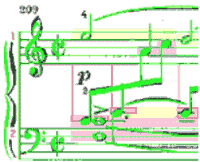
Mehrerer Stimmen in einer einzigen Zeile sind eine Herausforderung für Noten-Scan-Programme. Klavierwerke sind besonders schwierig. capella-scan löst auch solche Situationen souverän: Mit dem komfortablen Stimmen-Management analysiert es die Zusammenhänge und ordnet alle Noten korrekt in vertikaler und horizontaler Position zu. Farbliche Markierungen machen das sichtbar.
Texterkennung in zahlreichen Sprachen
capella-scan enthält ein Modul zur Texterkennung, so dass Liedtexte, Überschriften, Fußnoten und andere Textobjekte gleich mit erkannt werden. Im Hintergrund wird mit Wörterbüchern in verschiedenen Sprachen geprüft, ob das Erkannte plausibel ist.
Achtelpause oder Fliegendreck?
capella-scan erkennt Noten mit Tonhöhen und Tonlängen, Pausen und vieles mehr. Doch eigentlich ist eine Software ja unmusikalisch. Wann ist ein Punkt auf der Vorlage eine Note, wann eine Achtelpause oder wann einfach nur ein Schmutzfleck? Das ermittelt eine gründliche Plausibilitätsprüfung im Programm.
Welches Angebot passt für Sie?
Nutzen Sie capella-scan 15 Tage kostenlos und unverbindlich!
Software-Abo oder Kauflizenz?
Seit 2021 bieten wir beides an: Software als Abo oder eine Kauflizenz, also: monatlich einen kleineren Betrag zahlen oder einmalig einen größeren. Mit der Abo-Version bleiben Sie immer auf dem neuesten Stand der Software-Entwicklung. Mehr Info
Als Stammkunde sehen Sie Ihr persönliches Upgrade-Angebot oder Ihre Abo-Bedingungen in Ihrem Kundenkonto.
Alle Details
Den Funktionsumfang von capella-scan sehen Sie hier:
Sie besitzen bereits eine ältere capella-scan-Version?
Technische Voraussetzungen
Betriebssysteme
Windows 10, 11 (nur 64-bit)
macOS (13 bis 27)
